[Solana - Native vs Anchor] #2. Account 확인하기
목차
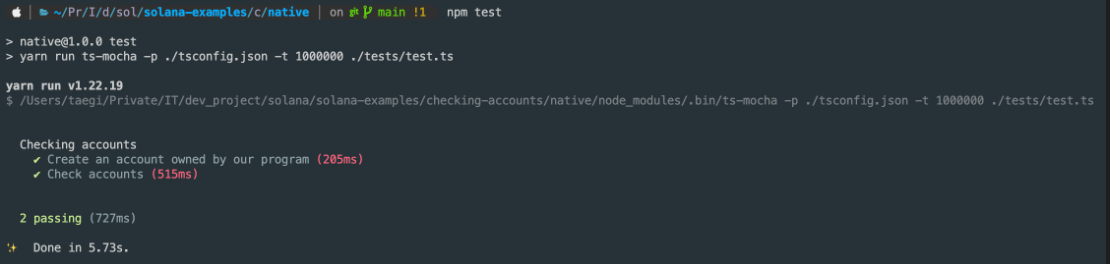
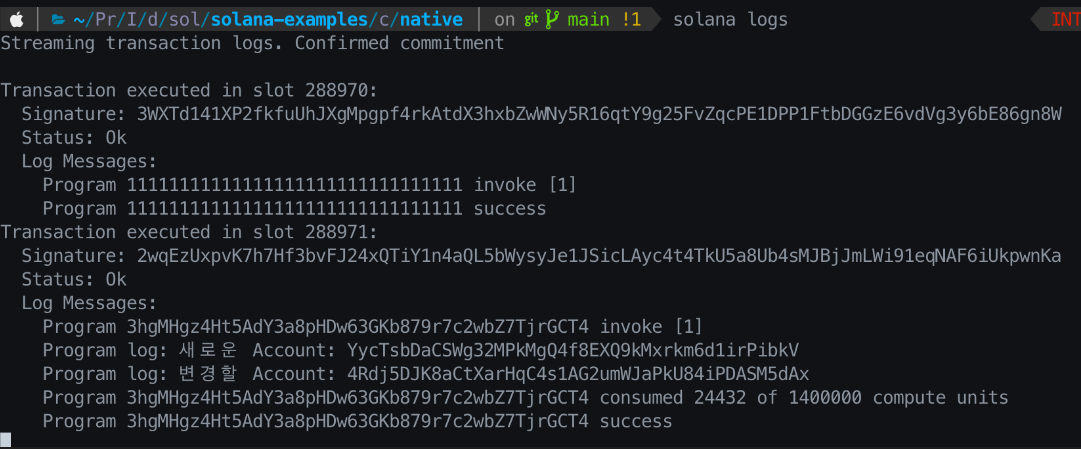
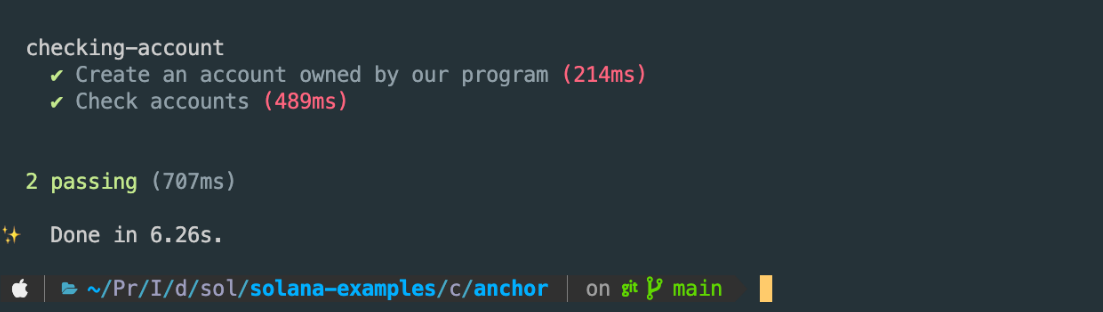
[Solana - Native vs Anchor] #2. Account 확인하기 이 글은 Solana - Native vs Anchor 시리즈의 2번째 글입니다. Account 확인하기 에서는 우리의 Program이 소유하는 Account를 하나 생성하고, Account가 생성됐는지 확인해보겠습니다.Account가 생성된 것인지 아닌지에 대해 확인하기 위해, Client에서 생성할 Account와 이미 생성한 Account 두 개의 키쌍을 Instruction으로 보낼 것입니다. 이 "생성한" Account 하나는 Client에서 미리 SystemProgram에 생성을 요청하고, 다른 하나의 Account는 생성을 요청하지 않는 키쌍입니다. Server Program은 이 두 개의 Account에 대해 몇 가지 확인하는 작업을 갖고 있습니다. 두 Account의 상태가 어떻게 다른지 알아봅시다. 빌드와 배포 등 기본적인 내용은 Hello Solana를 참고해주세요. Client Program이 요청하는 Transaction은 두 가지입니다. 위 이미지에서 볼 수 있듯이 Server Program은 넘어온 Account들에 대해 여러가지 검증 작업을 수행합니다. Native 프로그래밍을 먼저 살펴봅시다. 앞서 설명했듯이, Client는 두 개의 Keypair(Account)를 생성하고, 두 개의 Transaction을 보냅니다. 테스트 결과 System Program에 Account 생성을 요청하는 Transaction과 Server Program에 Account 확인을 요청하는 Transaction 모두 성공한 것을 볼 수 있습니다. Transaction logs에서도 두 개의 Transaction이 성공한 것을 볼 수 있습니다. Program ID로 나타나는 "11111111111111111111111111111111"은 System Program을 의미하고, "3hgMHgz4Ht5AdY3a8pHDw63GKb879r7c2wbZ7TjrGCT4"는 Server Program을 의미합니다. 다음은 Anchor 프로그래밍을 살펴봅시다. Server Program의 코드를 보면 Native 프로그래밍의 코드와 많이 다른 것을 알 수 있습니다. 특히 앞서 설명했던 검증 절차들이 보이지 않습니다. 이는 Anchor가 Client로부터 받은 Account들을 우리가 정의한 CheckingAccounts 타입에 바인딩하면서 기본적인 검증 처리를 자동으로 해주기 때문입니다. AccountInfo 타입과 UncheckedAccount 타입은 다른 타입과 달리 넘어온 Account에 대해 어떤 확인도 하지 않습니다. 이 타입을 사용할 때는 Rust의 "///" 또는 "/**" doc comment를 사용해서 이 Account가 안전하다는 것을 표시해줘야 합니다. 위 코드에서 "///" 주석을 제거해 보면 컴파일 에러가 발생하는 것을 확인할 수 있습니다. Client Program의 코드에서 System Program에 생성을 요청하는 코드는 Native 프로그램과 거의 같은 같습니다. 위 코드 "Check accounts"에서 Server Program에 Account 확인을 요청하는 절차가 Native Program과 다릅니다. Anchor 프로그래밍의 Server Program을 빌드하면 자동으로 ts 파일이 생성되는데, Client Program은 이 ts 파일을 사용합니다. 여기서는 checking_account.ts 파일 입니다. 전체 목차:Account 확인하기
프로그램 구조
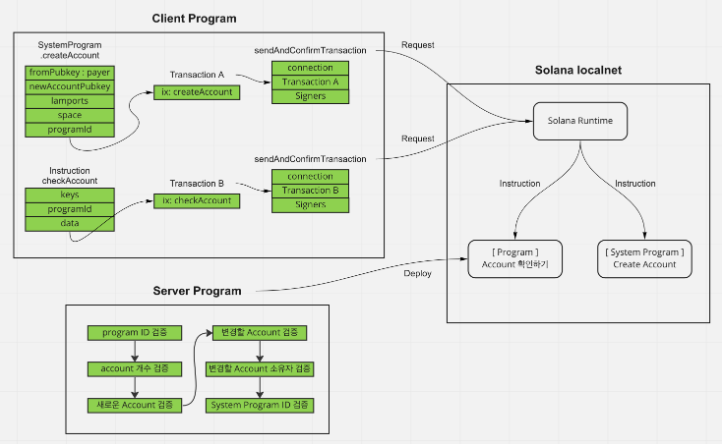
Native 프로그래밍
Server Program
use solana_program::{
account_info::{ AccountInfo, next_account_info },
entrypoint,
entrypoint::ProgramResult,
msg,
program_error::ProgramError,
pubkey::Pubkey,
system_program,
};
entrypoint!(process_instruction);
fn process_instruction(
program_id: &Pubkey,
accounts: &[AccountInfo],
_instruction_data: &[u8],
) -> ProgramResult {
// instruction으로 들어온 Program ID 값이 이 프로그램이 맞는지 확인
if system_program::check_id(program_id) {
return Err(ProgramError::IncorrectProgramId)
};
if accounts.len() < 4 {
msg!("Instruction은 4개의 인자가 필요합니다 :");
msg!(" payer, account_to_create, account_to_change, system_program");
return Err(ProgramError::NotEnoughAccountKeys)
};
// vec에 담겨져 넘어온 Account들은 프로그램이 정한 순서대로 넘겨야 합니다.
let accounts_iter = &mut accounts.iter();
let _payer = next_account_info(accounts_iter)?;
let account_to_create = next_account_info(accounts_iter)?;
let account_to_change = next_account_info(accounts_iter)?;
let system_program = next_account_info(accounts_iter)?;
// 새로 생성할 Account 초기화 검증
msg!("새로운 Account: {}", account_to_create.key);
if account_to_create.lamports() != 0 {
msg!("생성할 Account가 이미 초기화 됬습니다.");
return Err(ProgramError::AccountAlreadyInitialized)
};
// Create Account...
// 변경할 Account가 초기화 됐는지 검증
msg!("변경할 Account: {}", account_to_change.key);
if account_to_change.lamports() == 0 {
msg!("변경할 Account가 초기화되지 않았습니다.");
return Err(ProgramError::UninitializedAccount)
};
// 변경할 Account가 현재 프로그램이 소유한 Account가 맞는지 검증
if account_to_change.owner != program_id {
msg!("변경할 account의 소유자가 현재 프로그램이 아닙니다.");
return Err(ProgramError::IncorrectProgramId)
};
// System Program을 알맞게 보냈는지 검증
if system_program.key != &system_program::ID {
return Err(ProgramError::IncorrectProgramId)
};
Ok(())
}
-> 현재 ProgramId가 맞는지 검증.
-> lamports가 0이 아니면 이미 초기화된 것입니다.
-> 여기서 account_to_change는 Client에서 미리 System_Program에 생성 요청한 Account입니다.
-> Program이 특정 Account를 변경하기 위해서는 그 Account를 소유하고 있어야 합니다.
-> 넘어온 System Program의 ID 값이 올바른지 검증합니다. System Program ID 값은 solana native 라이브러리에 상수로 정의되어 있습니다.Client Program
import {
Connection,
Keypair,
PublicKey,
sendAndConfirmTransaction,
SystemProgram,
Transaction,
TransactionInstruction,
} from '@solana/web3.js';
function createKeypairFromFile(path: string): Keypair {
return Keypair.fromSecretKey(
Buffer.from(JSON.parse(require('fs').readFileSync(path, "utf-8")))
)
};
describe("Checking accounts", async () => {
const connection = new Connection(`http://127.0.0.1:8899`, 'confirmed');
const payer = createKeypairFromFile(require('os').homedir() + '/.config/solana/id.json');
const PROGRAM_ID: PublicKey = new PublicKey("3hgMHgz4Ht5AdY3a8pHDw63GKb879r7c2wbZ7TjrGCT4");
// System Program에 생성을 요창하고, 우리 프로그램이 수정할 Account
const accountToChange = Keypair.generate();
// 우리 프로그램이 생성할 Account
const accountToCreate = Keypair.generate();
it("Create an account owned by our program", async () => {
let ix = SystemProgram.createAccount({
fromPubkey: payer.publicKey,
newAccountPubkey: accountToChange.publicKey,
lamports: await connection.getMinimumBalanceForRentExemption(0),
space: 0,
programId: PROGRAM_ID,
});
await sendAndConfirmTransaction(
connection,
new Transaction().add(ix),
[payer, accountToChange]
);
});
it("Check accounts", async () => {
let ix = new TransactionInstruction({
keys: [
{pubkey: payer.publicKey, isSigner: true, isWritable: true},
{pubkey: accountToCreate.publicKey, isSigner: true, isWritable: true},
{pubkey: accountToChange.publicKey, isSigner: true, isWritable: true},
{pubkey: SystemProgram.programId, isSigner: false, isWritable: false}
],
programId: PROGRAM_ID,
data: Buffer.alloc(0),
});
await sendAndConfirmTransaction(
connection,
new Transaction().add(ix),
[payer, accountToCreate, accountToChange]
)
});
});
-> fromPubkey : 이 Instruction에 비용을 지불하는 payer
-> newAccountPubkey : 새로 생성할 Account의 pubkey
-> lamports : 새로 생성할 Account에 보낼 lamports
-> space : 새로 생성할 Account에 할당할 바이트 단위 공간
-> programId : 새로 생성할 Account를 소유할 ProgramId
-> keys : payer, Account_A, Account_B, System Program ID 네 개의 Account
-> programId : Server Program ID
-> data : 0Test
Anchor 프로그래밍
Server Program
use anchor_lang::prelude::*;
declare_id!("DYPmxWtKT24YyH2oKQ41ukNAtU6KVRpiYmCNnzzyW7jo");
#[program]
pub mod checking_account {
use super::*;
pub fn check_accounts(_ctx: Context<CheckingAccounts>) -> Result<()> {
Ok(())
}
}
#[derive(Accounts)]
pub struct CheckingAccounts<'info> {
payer: Signer<'info>,
/// CHECK: 이 Account의 데이터는 비어있습니다.
#[account(mut)]
account_to_create: AccountInfo<'info>,
/// CHECK: 이 Account의 데이터는 비어있습니다.
#[account(mut)]
account_to_change: AccountInfo<'info>,
system_program: Program<'info, System>,
}
-> payer: Signer 타입으로 이 Account가 서명했는지 검증합니다
-> account_to_create: AccountInfo 타입으로 Client에서 생성한 Account
-> account_to_change: AccountInfo 타입으로 Client에서 생성해 System Program으로 생성 요청했던 Account
-> system_program: Program 타입으로 Client에서 보낸 System Program의 AccountClient Program
import * as anchor from "@project-serum/anchor";
import { Program } from "@project-serum/anchor";
import { CheckingAccount } from "../target/types/checking_account";
describe("checking-account", () => {
const provider = anchor.AnchorProvider.env();
anchor.setProvider(provider);
const program = anchor.workspace.CheckingAccount as Program<CheckingAccount>;
const payer = provider.wallet as anchor.Wallet;
const accountToChange = anchor.web3.Keypair.generate();
const accountToCreate = anchor.web3.Keypair.generate();
it("Create an account owned by our program", async () => {
let ix = anchor.web3.SystemProgram.createAccount({
fromPubkey: provider.wallet.publicKey,
newAccountPubkey: accountToChange.publicKey,
lamports: await provider.connection.getMinimumBalanceForRentExemption(0),
space: 0,
programId: program.programId,
});
await anchor.web3.sendAndConfirmTransaction(
provider.connection,
new anchor.web3.Transaction().add(ix),
[payer.payer, accountToChange]
);
});
it("Check accounts", async () => {
await program.methods.checkAccounts()
.accounts({
payer: payer.publicKey,
accountToCreate: accountToCreate.publicKey,
accountToChange: accountToChange.publicKey,
systemProgram: anchor.web3.SystemProgram.programId,
})
.signers([payer.payer])
.rpc();
});
});
-> Server Program에서 정의한 check_accounts 함수로 camelCase로 변환되어 만들어집니다.
-> 앞서 설명한 4개의 Account들
-> 서명자
-> rpc 호출Test
References